pandas5

Pandas Introduction 5

vectorized string operation

capitalize

It needs for loop to realize the capitalization.

1
2
3
import numpy as np 
data = ['peter', 'Paul', 'MARY', 'gUIDO'] [s.capitalize() for s in data]
#Out: ['Peter', 'Paul', 'Mary', 'Guido']

but it can’t be used with None types:

1
2
3
4
5
6
7
8
9
10
11
12
13
14
data = ['peter', 'Paul', None, 'MARY', 'gUIDO'] [s.capitalize() for s in data] 
'''
---------------------------------------------------------------------------
---------------------------------------------------------------------------
AttributeError Traceback (most recent call last)
<ipython-input-3-fc1d891ab539> in <module>()
1 data = ['peter', 'Paul', None, 'MARY', 'gUIDO']
----> 2 [s.capitalize() for s in data]
<ipython-input-3-fc1d891ab539> in <listcomp>(.0)
1 data = ['peter', 'Paul', None, 'MARY', 'gUIDO']
----> 2 [s.capitalize() for s in data]
AttributeError: 'NoneType' object has no attribute 'capitalize'
---------------------------------------------------------------------------
'''

another way:

1
2
3
4
5
6
7
8
9
10
11
12
13
14
15
16
17
18
19
20
21
22
#make the array to DataFrame
import pandas as pd
names = pd.Series(data)
names
'''
Out:
0 peter
1 Paul
2 None
3 MARY
4 gUIDO
dtype: object
'''

names.str.capitalize()
Out:
0 Peter
1 Paul
2 None
3 Mary
4 Guido
dtype: object

other functions in pandas.str:

len() lower() translate() islower()

ljust() upper() startswith() isupper()

rjust() find() endswith() isnumeric()

center() rfifind() isalnum() isdecimal()

zfifill() index() isalpha() split()

strip() rindex() isdigit() rsplit()

rstrip() capitalize() isspace() partition()

lstrip() swapcase() istitle() rpartition()

they are similar to those in python

comparison

方法 描述
match() 对每个元素调用 re.match(),返回布尔类型值
extract() 对每个元素调用 re.match(),返回匹配的字符串组(groups)
findall() 对每个元素调用 re.findall()
replace() 用正则模式替换字符串
contains() 对每个元素调用 re.search(),返回布尔类型值
count() 计算符合正则模式的字符串的数量
split() 等价于 str.split(),支持正则表达式
rsplit() 等价于 str.rsplit(),支持正则表达式
1
2
3
4
5
6
7
8
9
10
11
12
13
14
15
16
17
18
19
20
21
22
23
24
25
26
27
28
monte = pd.Series(['Graham Chapman', 'John Cleese', 'Terry Gilliam', 
'Eric Idle', 'Terry Jones', 'Michael Palin'])

#get the continuous letters in the front of every object (first name)
monte.str.extract('([A-Za-z]+)')
'''
Out:
0 Graham
1 John
2 Terry
3 Eric
4 Terry
5 Michael
dtype: object
'''

#choose names star and finish with consonant
monte.str.findall(r'^[^AEIOU].*[^aeiou]$')
'''
Out:
0 [Graham Chapman]
1 []
2 [Terry Gilliam]
3 []
4 [Terry Jones]
5 [Michael Palin]
dtype: object
'''

others:

方法 描述
get() 获取元素索引位置上的值,索引从 0 开始
slice() 对元素进行切片取值
slice_replace() 对元素进行切片替换
cat() 连接字符串(此功能比较复杂,建议阅读文档)
repeat() 重复元素
normalize() 将字符串转换为 Unicode 规范形式
pad() 在字符串的左边、右边或两边增加空格
wrap() 将字符串按照指定的宽度换行
join() 用分隔符连接 Series 的每个元素
get_dummies() 按照分隔符提取每个元素的 dummy 变量,转换为独热(one-hot)编码的 DataFrame

df.str.slice(0, 3) = df.str[0:3]

1
2
3
4
5
6
7
8
9
10
11
12
13
14
15
16
17
18
19
20
21
22
monte.str[0:3] 
'''
Out: 0 Gra
1 Joh
2 Ter
3 Eri
4 Ter
5 Mic
dtype: object
'''

monte.str.split().str.get(-1)
'''
Out:
0 Chapman
1 Cleese
2 Gilliam
3 Idle
4 Jones
5 Palin
dtype: object
'''

get_dummies()

1
2
3
4
5
6
7
8
9
10
11
12
13
14
15
16
17
18
19
20
21
22
23
24
25
full_monte = pd.DataFrame({'name': monte, 
'info': ['B|C|D', 'B|D', 'A|C', 'B|D', 'B|C', 'B|C|D']})
full_monte
'''
Out:
info name
0 B|C|D Graham Chapman
1 B|D John Cleese
2 A|C Terry Gilliam
3 B|D Eric Idle
4 B|C Terry Jones
5 B|C|D Michael Palin
'''

full_monte['info'].str.get_dummies('|')
'''
Out:
A B C D
0 0 1 1 1
1 0 1 0 1
2 1 0 1 0
3 0 1 0 1
4 0 1 1 0
5 0 1 1 1
'''

time

the format of time

1
2
3
4
5
6
7
8
from datetime import datetime 
datetime(year=2015, month=7, day=4)
#Out: datetime.datetime(2015, 7, 4, 0, 0)

from dateutil import parser
date = parser.parse("4th of July, 2015")
date
#Out: datetime.datetime(2015, 7, 4, 0, 0)

show what day is today

1
2
date.strftime('%A') #%A is the special code for this function
#Out: 'Saturday'

calculate with numpy:

1
2
3
4
import numpy as np 
date = np.array('2015-07-04', dtype=np.datetime64)
date
#Out: array(datetime.date(2015, 7, 4), dtype='datetime64[D]')
1
2
3
4
5
6
7
8
date + np.arange(12) 
'''
Out:
array(['2015-07-04', '2015-07-05', '2015-07-06', '2015-07-07',
'2015-07-08', '2015-07-09', '2015-07-10', '2015-07-11',
'2015-07-12', '2015-07-13', '2015-07-14', '2015-07-15'],
dtype='datetime64[D]')
'''

when it comes to minute:

1
2
np.datetime64('2015-07-04 12:00') 
#Out: numpy.datetime64('2015-07-04T12:00')

the last digit can be changed:

1
2
np.datetime64('2015-07-04 12:59:59.50', 'ns') 
#Out: numpy.datetime64('2015-07-04T12:59:59.500000000')
代码 含义 时间跨度 (相对) 时间跨度 (绝对)
Y 年(year) ± 9.2e18 年 [9.2e18 BC, 9.2e18 AD]
M 月(month) 7.6e17 年 ±[7.6e17 BC, 7.6e17 AD]
W 周(week) ± 1.7e17 年 [1.7e17 BC, 1.7e17 AD]
D 日(day) ± 2.5e16 年 [2.5e16 BC, 2.5e16 AD]
h 时(hour) ± 1.0e15 年 [1.0e15 BC, 1.0e15 AD]
m 分(minute) ± 1.7e13 年 [1.7e13 BC, 1.7e13 AD]
s 秒(second) ± 2.9e12 年 [ 2.9e9 BC, 2.9e9 AD]
ms 毫秒(millisecond) ± 2.9e9 年 [ 2.9e6 BC, 2.9e6 AD]
us 微秒(microsecond) ± 2.9e6 年 [290301 BC, 294241 AD]
ns 纳秒(nanosecond) ± 292 年 [ 1678 AD, 2262 AD]
ps 皮秒(picosecond) ± 106 天 [ 1969 AD, 1970 AD]
fs 飞秒(femtosecond) ± 2.6 小时 [ 1969 AD, 1970 AD]
as 原秒(attosecond) ± 9.2 秒 [ 1969 AD, 1970 AD]

use time as index

timestamp

1
2
3
4
5
6
7
8
9
10
11
12
13
14
15
16
17
18
index = pd.DatetimeIndex(['2014-07-04', '2014-08-04', '2015-07-04', '2015-08-04']) 
data = pd.Series([0, 1, 2, 3], index=index)
data
'''
Out: 2014-07-04 0
2014-08-04 1
2015-07-04 2
2015-08-04 3
dtype: int64
'''

data['2015']
'''
Out:
2015-07-04 2
2015-08-04 3
dtype: int64
'''

pd.datetime() can change different format of time into one:

1
2
3
4
5
6
7
dates = pd.to_datetime([datetime(2015, 7, 3), '4th of July, 2015', 
'2015-Jul-6', '07-07-2015', '20150708'])
dates
'''
Out: DatetimeIndex(['2015-07-03', '2015-07-04', '2015-07-06', '2015-07-07', '2015-07-08'],
dtype='datetime64[ns]', freq=None)
'''

period

1
2
3
4
5
dates.to_period('D') 
'''
Out: PeriodIndex(['2015-07-03', '2015-07-04', '2015-07-06', '2015-07-07', '2015-07-08'],
dtype='int64', freq='D')
'''

delta

1
2
3
4
5
6
dates - dates[0] 
'''
Out:
TimedeltaIndex(['0 days', '1 days', '3 days', '4 days', '5 days'],
dtype='timedelta64[ns]', freq=None)
'''

pd.date_range(): show the time in order

1
2
3
4
5
6
7
8
9
10
11
12
13
pd.date_range('2015-07-03', '2015-07-10') 
'''
Out: DatetimeIndex(['2015-07-03', '2015-07-04', '2015-07-05', '2015-07-06',
'2015-07-07', '2015-07-08', '2015-07-09', '2015-07-10'],
dtype='datetime64[ns]', freq='D'
'''

pd.date_range('2015-07-03', periods=8)
'''
Out: DatetimeIndex(['2015-07-03', '2015-07-04', '2015-07-05', '2015-07-06',
'2015-07-07', '2015-07-08', '2015-07-09', '2015-07-10'],
dtype='datetime64[ns]', freq='D')
'''

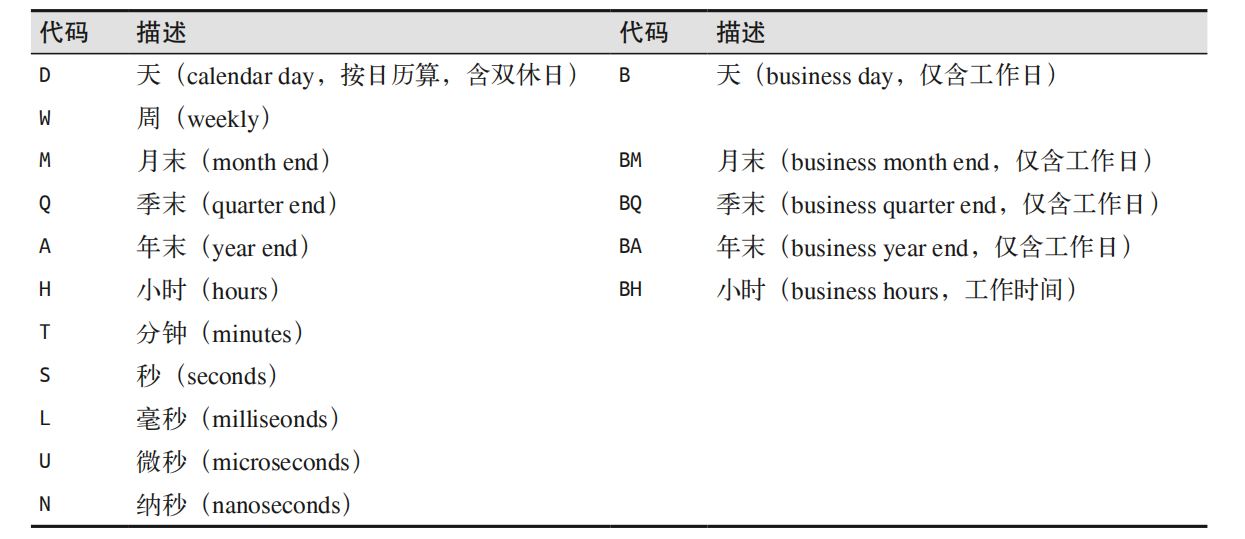
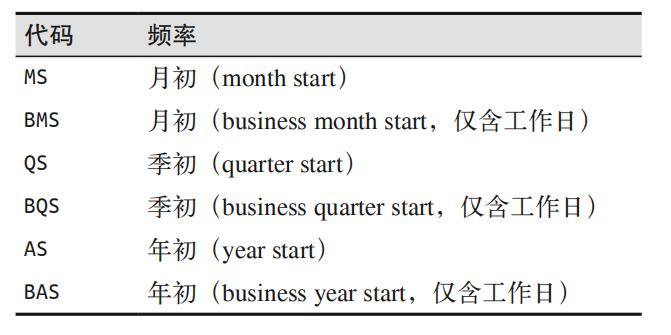
use freq to change the difference between time points

1
2
3
4
5
6
7
8
pd.date_range('2015-07-03', periods=8, freq='H') 
'''
Out: DatetimeIndex(['2015-07-03 00:00:00', '2015-07-03 01:00:00',
'2015-07-03 02:00:00', '2015-07-03 03:00:00',
'2015-07-03 04:00:00', '2015-07-03 05:00:00',
'2015-07-03 06:00:00', '2015-07-03 07:00:00'],
dtype='datetime64[ns]', freq='H')
'''

dmvc8g.png

dmvo5T.png

resample

1
2
3
4
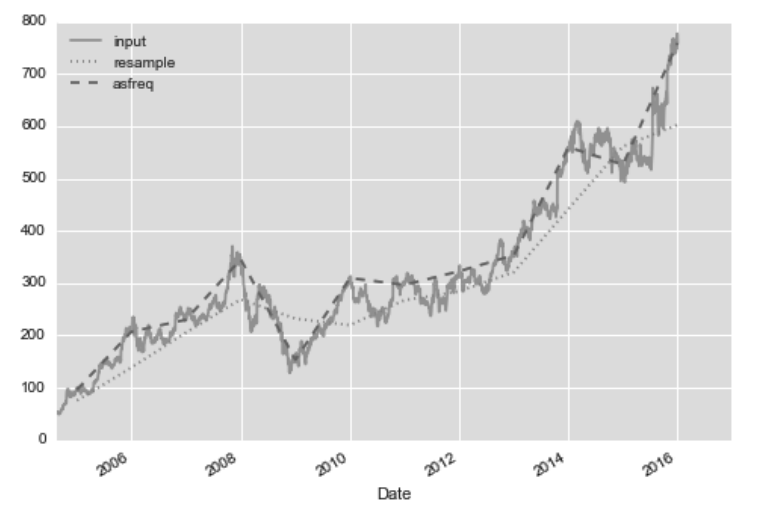
goog.plot(alpha=0.5, style='-') 
goog.resample('BA').mean().plot(style=':')
goog.asfreq('BA').plot(style='--');
plt.legend(['input', 'resample', 'asfreq'], loc='upper left');

dmxUiT.png

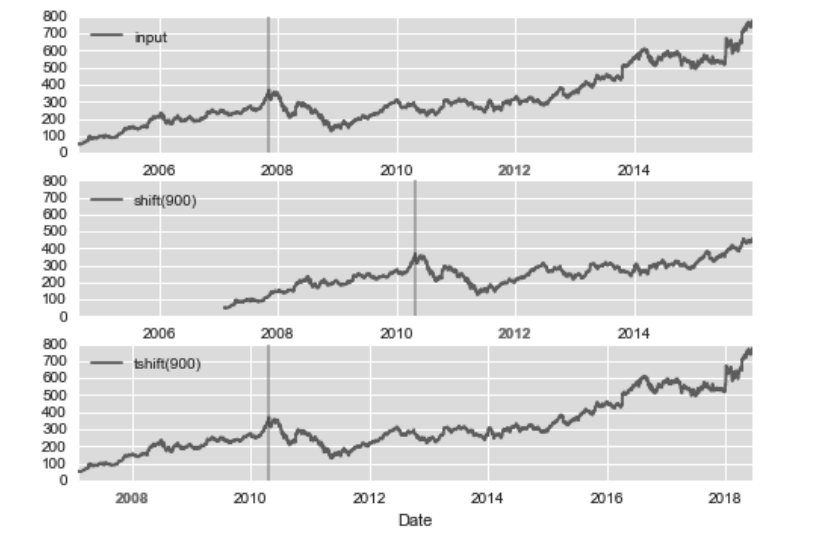
shift() and tshift()

make the value shift 900 days:
dmx4QH.png

pandas.eval()

faster to calculate

(1) 算术运算符。

1
2
3
4
result1 = -df1 * df2 / (df3 + df4) - df5 
result2 = pd.eval('-df1 * df2 / (df3 + df4) - df5')
np.allclose(result1, result2)
#Out: True

(2) 比较运算符。

1
2
3
4
result1 = (df1 < df2) & (df2 <= df3) & (df3 != df4) 
result2 = pd.eval('df1 < df2 <= df3 != df4')
np.allclose(result1, result2)
#Out: True

(3) 位运算符。

1
2
3
4
result1 = (df1 < 0.5) & (df2 < 0.5) | (df3 < df4) 
result2 = pd.eval('(df1 < 0.5) & (df2 < 0.5) | (df3 < df4)')
np.allclose(result1, result2)
#Out: True
1
2
3
result3 = pd.eval('(df1 < 0.5) and (df2 < 0.5) or (df3 < df4)') 
np.allclose(result1, result3)
#Out: True

(4) 对象属性与索引。

1
2
3
4
result1 = df2.T[0] + df3.iloc[1] 
result2 = pd.eval('df2.T[0] + df3.iloc[1]')
np.allclose(result1, result2)
#Out: True

query:

1
2
3
4
result1 = df[(df.A < 0.5) & (df.B < 0.5)] 
result2 = df.query('A < 0.5 and B < 0.5')
np.allclose(result1, result2)
#Out: True
1
2
3
4
5
Cmean = df['C'].mean() 
result1 = df[(df.A < Cmean) & (df.B < Cmean)]
result2 = df.query('A < @Cmean and B < @Cmean')
np.allclose(result1, result2)
#Out: True