有关海华AI比赛5

05.1.Read annotations from JSON file

Import packages

1
2
3
4
5
6
7
8
9
10
# -*- coding: UTF-8 -*- 
# import packages
%matplotlib inline
import numpy as np
import cv2
import matplotlib
import matplotlib.pyplot as plt
import json
import csv
import random

Open JSON file

1
2
with open('./dataset/resizedFullGarbageDataset/train.json', 'r', encoding='utf-8') as f:
train_labels = json.load(f) #read the file

Observe the data format

1
train_labels #observe the types of the data
1
2
3
4
5
6
7
8
9
10
11
out:{'info': None,
'lincenses': None,
'images': [{'file_name': 'images_withoutrect/11003.png',
'height': 1080,
'width': 1920,
'image_id': 11003},
{'file_name': 'images_withoutrect/11004.png',
'height': 1080,
'width': 1920,
'image_id': 11004},
......
1
2
type(train_labels) #find the tye of the labels
#out:dict
1
2
train_labels.keys()
#out:dict_keys(['info', 'lincenses', 'images', 'type', 'annotations', 'categories'])

Read categories

1
train_labels['categories'] #print the categories
1
2
3
4
5
6
7
out:[{'id': 1, 'name': '瓜子壳'},
{'id': 2, 'name': '核桃'},
{'id': 3, 'name': '花生壳'},
{'id': 4, 'name': '毛豆壳'},
{'id': 5, 'name': '西瓜子'},
{'id': 6, 'name': '枣核'},
......
1
2
type(train_labels['categories'])
#out:list
1
2
train_labels['categories'][0]#choose the first one
#out:{'id': 1, 'name': '瓜子壳'}

Convert to list in order to use easier. (Attention: id begins at 1, while the index of list begins at 0)

1
2
3
4
names = []
for label in train_labels['categories']:
names.append(label['name'])
print(names) #put the categories into a list and show it

#out:[‘瓜子壳’, ‘核桃’, ‘花生壳’, ‘毛豆壳’, ‘西瓜子’, ‘枣核’, ‘话梅核’, ‘苹果皮’, ‘柿子皮’, ‘西瓜皮’, ‘香蕉皮’, ‘柚子皮’, ‘荔枝壳’, ‘芒果皮’, ‘苹果核’, ‘干果’, ‘桔子皮’, ‘饼干’, ‘面包’, ‘糖果’, ‘宠物饲料’, ‘风干食品’, ‘蜜饯’, ‘肉干’, ‘冲泡饮料粉’, ‘奶酪’, ‘罐头’, ‘糕饼’, ‘薯片’, ‘树叶’, ‘杂草’, ‘绿植’, ‘鲜花’, ‘豆类’, ‘动物内脏’, ‘绿豆饭’, ‘谷类及加工物’, ‘贝类去硬壳’, ‘虾’, ‘面食’, ‘肉类’, ‘五谷杂粮’, ‘排骨-小肋排’, ‘鸡’, ‘鸡骨头’, ‘螺蛳’, ‘鸭’, ‘鱼’, ‘菜根’, ‘菜叶’, ‘菌菇类’, ‘鱼鳞’, ‘调料’, ‘茶叶渣’, ‘咖啡渣’, ‘粽子’, ‘动物蹄’, ‘小龙虾’, ‘蟹壳’, ‘酱料’, ‘鱼骨头’, ‘蛋壳’, ‘中药材’, ‘中药渣’, ‘镜子’, ‘玻璃制品’, ‘窗玻璃’, ‘碎玻璃片’, ‘化妆品玻璃瓶’, ‘食品及日用品玻璃瓶罐’, ‘保温杯’, ‘玻璃杯’, ‘图书期刊’, ‘报纸’, ‘食品外包装盒’, ‘鞋盒’, ‘利乐包’, ‘广告单’, ‘打印纸’, ‘购物纸袋’, ‘日历’, ‘快递纸袋’, ‘信封’, ‘烟盒’, ‘易拉罐’, ‘金属制品’, ‘吸铁石’, ‘铝制品’, ‘金属瓶罐’, ‘金属工具’, ‘罐头盒’, ‘勺子’, ‘菜刀’, ‘叉子’, ‘锅’, ‘金属筷子’, ‘数据线’, ‘塑料玩具’, ‘矿泉水瓶’, ‘塑料泡沫’, ‘塑料包装’, ‘硬塑料’, ‘一次性塑料餐盒餐具’, ‘电线’, ‘塑料衣架’, ‘密胺餐具’, ‘亚克力板’, ‘PVC管’, ‘插座’, ‘化妆品塑料瓶’, ‘篮球’, ‘足球’, ‘KT板’, ‘食品塑料盒’, ‘食用油桶’, ‘塑料杯’, ‘塑料盆’, ‘一次性餐盒’, ‘废弃衣服’, ‘鞋’, ‘碎布’, ‘书包’, ‘床上用品’, ‘棉被’, ‘丝绸手绢’, ‘枕头’, ‘毛绒玩具’, ‘皮带’, ‘电路板’, ‘充电宝’, ‘木制品’, ‘优盘’, ‘灯管灯泡’, ‘节能灯’, ‘二极管’, ‘纽扣电池’, ‘手机电池’, ‘镍镉电池’, ‘锂电池’, ‘蓄电池’, ‘胶卷’, ‘照片’, ‘指甲油瓶’, ‘X光片’, ‘农药瓶’, ‘杀虫剂及罐’, ‘蜡烛’, ‘墨盒’, ‘染发剂壳’, ‘消毒液瓶’, ‘油漆桶’, ‘药品包装’, ‘药瓶’, ‘废弃针管’, ‘输液管’, ‘口服液瓶’, ‘眼药水瓶’, ‘水银温度计’, ‘水银血压计’, ‘胶囊’, ‘药片’, ‘固体杀虫剂’, ‘甘蔗皮’, ‘坚果壳’, ‘橡皮泥’, ‘毛发’, ‘棉签’, ‘创可贴’, ‘口红’, ‘笔’, ‘纸巾’, ‘胶带’, ‘湿巾’, ‘水彩笔’, ‘打火机’, ‘防碎气泡膜’, ‘榴莲壳’, ‘睫毛膏’, ‘眼影’, ‘仓鼠浴沙’, ‘大骨棒’, ‘旧毛巾’, ‘竹制品’, ‘粉笔’, ‘一次性口罩’, ‘一次性手套’, ‘粉底液’, ‘灰土’, ‘尼龙制品’, ‘尿片’, ‘雨伞’, ‘带胶制品’, ‘牙膏皮’, ‘狗尿布’, ‘椰子壳’, ‘粉扑’, ‘破碗碟’, ‘陶瓷’, ‘卫生纸’, ‘烟头’, ‘假睫毛’, ‘猫砂’, ‘牙刷’, ‘玉米棒’]

Read annotations

1
train_labels['annotations']
1
2
3
4
5
6
7
8
9
10
11
out:[{'area': 81909.20209190401,
'iscrowd': 0,
'image_id': 11003,
'bbox': [636.08832, 305.77176, 298.5888, 274.32108000000005],
'category_id': 2},
{'area': 105273.393928704,
'iscrowd': 0,
'image_id': 11004,
'bbox': [804.4512, 420.56064, 306.46848, 343.5048],
'category_id': 2},
......
1
2
type(train_labels['annotations'])
#out:list

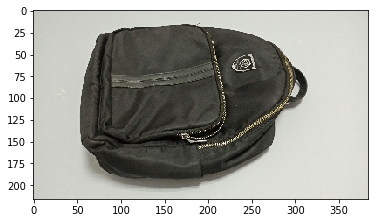
As an example, let’s load an image and its annotation.

1
2
3
4
5
6
7
8
9
10
11
12
13
n = random.randint(1, len(train_labels['annotations'])) # select the random n-th image as example

image_id = train_labels['annotations'][n]['image_id']
category_id = train_labels['annotations'][n]['category_id']
category_name = names[category_id - 1] # ←look here

image = cv2.imread('./dataset/resizedFullGarbageDataset/train_resized/' + str(image_id) + '.jpg') #load the pictures

plt.imshow(cv2.cvtColor(image, cv2.COLOR_BGR2RGB)) #use cv2 to show the picture
print("Index:%d\nFilename:%d.jpg\nCategory:%d-%s"%(n, image_id, category_id, category_name)) #\n means changing to another row
#out:Index:47056
# Filename:265768.jpg
# Category:122-书包

8If1PA.png

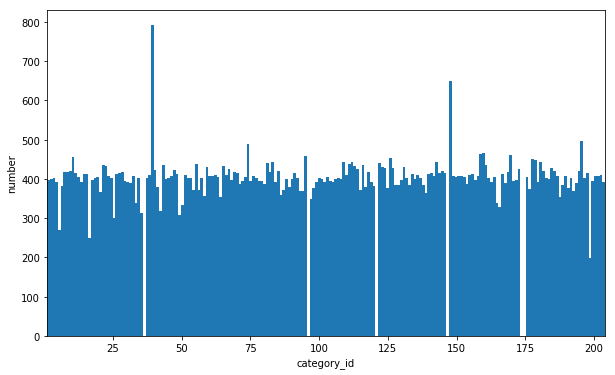
Observe the distribution of classes.

1
2
3
4
5
6
7
image_ids = []
category_ids = []
category_names = []
for label in train_labels['annotations']:
image_ids.append(label['image_id']) #add pictures to the list
category_ids.append(label['category_id']) #add category
category_names.append(names[label['category_id'] - 1])
1
2
3
4
5
plt.figure(figsize=(10, 6))
plt.hist(category_ids, bins=len(names), density=0)
plt.xlim(1, 204)
plt.xlabel("category_id")
plt.ylabel("number");

8IfBPs.png

Convert annotations into CSV format

1
2
3
4
with open('./dataset/resizedFullGarbageDataset/train.csv','w') as f:
f.write("id,label,name,filename\n")
for i in range(len(image_ids)):
f.write("%s,%s,%s,%s.jpg\n"%(str(image_ids[i]), str(category_ids[i]), names[category_ids[i]-1], str(image_ids[i])))

05.2.Train a garbage classifier

1
2
3
4
5
6
7
8
9
10
11
12
13
14
15
16
17
18
19
from __future__ import absolute_import, division, print_function, unicode_literals

# TensorFlow and tf.keras
import tensorflow as tf
from tensorflow import keras
from tensorflow.keras import backend as K
from tensorflow.keras.preprocessing.image import ImageDataGenerator
from tensorflow.keras.callbacks import LearningRateScheduler

# Helper libraries
import numpy as np
import matplotlib.pyplot as plt
plt.rcParams['font.sans-serif'] = ['SimHei'] # 用来正常显示中文标签
plt.rcParams['axes.unicode_minus'] = False # 用来正常显示负号
import random
import pandas as pd # ← a new package is needed to be install, use > conda install pandas
import cv2

print(tf.__version__)

Import dataset and preprocessing

Because our dataset is a bit large, RAM may not be enough to directly load all images. We can use flow_from_dataframe to load our dataset. (click here to read more about this function)
First, load labels from our .csv file. We use pandas.read_csv, it loads csv file to DataFrame format.

1
2
df=pd.read_csv("./dataset/resizedFullGarbageDataset/train.csv", encoding='gbk', dtype=str)
df
id label name filename
0 11003 2 核桃 11003.jpg
1 11004 2 核桃 11004.jpg
2 11005 2 核桃 11005.jpg
3 11006 2 核桃 11006.jpg
… …… …… …… ……

Then, use keras.preprocessing.image.ImageDataGenerator to load trainset.
‘catagories’ in the JSON file says, the dataset contains 202 classes, but actually it has only 198 classes. To avoid confusing df['label'] with index of classifier output, we use df['name'] as input.
75% of images are set as trainset, while 25% of images are set as testset.

1
2
3
4
5
6
7
8
9
10
11
12
batch_size = 32
sizeX, sizeY = 112, 112

datagen=ImageDataGenerator(rescale=1./255, validation_split=0.25)
#trainset:
trainset = datagen.flow_from_dataframe(dataframe=df, directory='./dataset/resizedFullGarbageDataset/train_resized', #the position of file
x_col='filename', y_col='name', class_mode='categorical', target_size=(sizeX,sizeY),
batch_size=batch_size, shuffle=True, seed=0Xabc123, subset='training')
#testset:
testset = datagen.flow_from_dataframe(dataframe=df, directory='./dataset/resizedFullGarbageDataset/train_resized',
x_col='filename', y_col='name', class_mode='categorical', target_size=(sizeX,sizeY),
batch_size=batch_size, shuffle=True, seed=0Xabc123, subset='validation')

Correspondingly, we can use .class_indices to see the relationship between name and index before one-hot encoding.

1
2
names = trainset.class_indices
names
1
2
3
4
5
6
7
{'KT板': 0,
'PVC管': 1,
'X光片': 2,
'一次性口罩': 3,
'一次性塑料餐盒餐具': 4,
'一次性手套': 5,
......

We can define a function to get name through index.

1
2
def getname(index):
return list(names)[index]

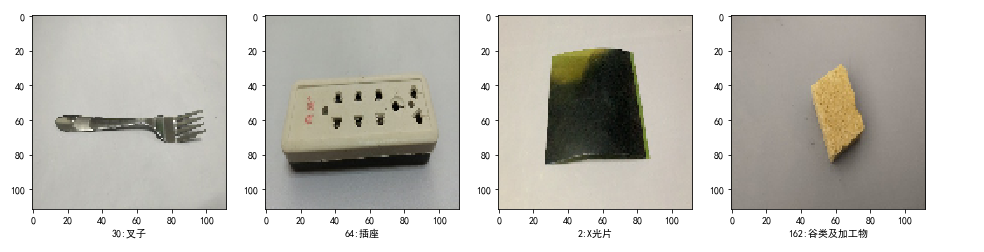
trainset[i] has two parts. trainset[i][0] is the i-th batch of image, while trainset[i][1] is one-hot encodings which represents classes.

1
2
3
4
5
6
7
plt.figure(figsize=(16,6))
n = random.randint(0,1874)
for i in range(4):
plt.subplot(1,4,i+1)
plt.imshow(trainset[n][0][i]) #plot the pictures
index = np.argmax(trainset[n][1][i])
plt.xlabel(str(index) + ':' + getname(index)) #show the category

87h9DP.png

Describe our model

As an example, we describe the following model.
(This example may not have good performance.)

1
2
3
4
5
6
7
8
9
10
11
12
13
14
15
16
17
18
19
input_shape = (sizeX, sizeY, 3)

model = keras.Sequential([
keras.layers.Conv2D(16, kernel_size=(5, 5),
activation='relu',
input_shape=input_shape),
keras.layers.MaxPooling2D(pool_size=(2, 2)),
keras.layers.Conv2D(32, kernel_size=(5, 5), activation='relu'),
keras.layers.MaxPooling2D(pool_size=(2, 2)),
keras.layers.Flatten(),
keras.layers.Dense(120, activation='relu'),
keras.layers.Dense(84, activation='relu'),
keras.layers.Dense(198, activation='softmax')
])


model.compile(loss=keras.losses.categorical_crossentropy,
optimizer=keras.optimizers.Adam(),
metrics=["accuracy"])

Start learning

Because the dataset is large, it may take a very long time.

1
2
3
4
5
6
7
8
9
10
STEP_SIZE_TRAIN=trainset.n//trainset.batch_size
STEP_SIZE_VALID=testset.n//testset.batch_size
print(STEP_SIZE_TRAIN, STEP_SIZE_VALID)

model.fit_generator(generator=trainset,
steps_per_epoch=STEP_SIZE_TRAIN,
validation_data=testset,
validation_steps=STEP_SIZE_VALID,
epochs=1
)

Evaluate the model

1
model.evaluate_generator(testset,verbose=1) #predict

Save the trained model

1
2
modelname = 'garbageExample0'
model.save('./TrainedModels/' + modelname + '.h5')#create the file and save it

05.3.Make prediction on validationset

from future import absolute_import, division, print_function, unicode_literals

TensorFlow and tf.keras

import tensorflow as tf
from tensorflow import keras
from tensorflow.keras import backend as K
from tensorflow.keras.preprocessing.image import ImageDataGenerator
from tensorflow.keras.callbacks import LearningRateScheduler
from tensorflow.keras.preprocessing import image

Helper libraries

1
2
3
4
5
6
7
8
9
import numpy as np
import matplotlib.pyplot as plt
plt.rcParams['font.sans-serif'] = ['SimHei'] # 用来正常显示中文标签
plt.rcParams['axes.unicode_minus'] = False # 用来正常显示负号
import random
import pandas as pd # ← a new package is needed to be install, use > conda install pandas
import cv2
import os
import json

Load trained model

1
2
modelname = 'garbageExample0'
model = keras.models.load_model('./trainedModels/' + modelname + '.h5')

Import validationset

1
2
3
4
valiset_path = './dataset/resizedFullGarbageDataset/val_resized'
valiset_filenames = os.listdir(valiset_path)
len(valiset_filenames)
#out:10000

Define getname() function

The names is in the order generated by flow_from_dataframe before training.

1
2
3
4
5
6
7
8
9
10
11
12
13
14
15
16
17
18
19
20
21
22
23
24
25
26
27
28
29
30
31
32
33
34
35
36
37
38
39
40
41
42
names = {'KT板': 0, 'PVC管': 1, 'X光片': 2, '一次性口罩': 3, '一次性塑料餐盒餐具': 4, '一次性手套': 5,
'一次性餐盒': 6, '丝绸手绢': 7, '中药材': 8, '中药渣': 9, '书包': 10,
'二极管': 11, '五谷杂粮': 12, '亚克力板': 13, '仓鼠浴沙': 14, '优盘': 15,
'保温杯': 16, '信封': 17, '假睫毛': 18, '充电宝': 19, '农药瓶': 20,
'冲泡饮料粉': 21, '创可贴': 22, '利乐包': 23, '动物内脏': 24, '动物蹄': 25,
'勺子': 26, '化妆品塑料瓶': 27, '化妆品玻璃瓶': 28, '卫生纸': 29, '叉子': 30,
'口服液瓶': 31, '口红': 32, '吸铁石': 33, '咖啡渣': 34, '固体杀虫剂': 35,
'图书期刊': 36, '坚果壳': 37, '塑料包装': 38, '塑料杯': 39, '塑料泡沫': 40,
'塑料玩具': 41, '塑料盆': 42, '塑料衣架': 43, '墨盒': 44, '大骨棒': 45,
'奶酪': 46, '宠物饲料': 47, '密胺餐具': 48, '小龙虾': 49, '尼龙制品': 50,
'尿片': 51, '带胶制品': 52, '干果': 53, '广告单': 54, '床上用品': 55,
'废弃衣服': 56, '废弃针管': 57, '快递纸袋': 58, '手机电池': 59, '打印纸': 60,
'报纸': 61, '指甲油瓶': 62, '排骨-小肋排': 63, '插座': 64, '数据线': 65,
'日历': 66, '旧毛巾': 67, '易拉罐': 68, '木制品': 69, '杀虫剂及罐': 70,
'杂草': 71, '枕头': 72, '枣核': 73, '染发剂壳': 74, '柚子皮': 75,
'柿子皮': 76, '树叶': 77, '核桃': 78, '桔子皮': 79, '棉签': 80,
'棉被': 81, '椰子壳': 82, '榴莲壳': 83, '橡皮泥': 84, '毛发': 85,
'毛绒玩具': 86, '毛豆壳': 87, '水银温度计': 88, '水银血压计': 89, '油漆桶': 90,
'消毒液瓶': 91, '湿巾': 92, '灯管灯泡': 93, '灰土': 94, '烟头': 95,
'烟盒': 96, '照片': 97, '牙刷': 98, '牙膏皮': 99, '狗尿布': 100,
'猫砂': 101, '玉米棒': 102, '玻璃制品': 103, '玻璃杯': 104, '瓜子壳': 105,
'甘蔗皮': 106, '电线': 107, '电路板': 108, '皮带': 109, '眼影': 110,
'眼药水瓶': 111, '睫毛膏': 112, '矿泉水瓶': 113, '破碗碟': 114, '硬塑料': 115,
'碎玻璃片': 116, '窗玻璃': 117, '竹制品': 118, '笔': 119, '篮球': 120,
'粉底液': 121, '粉扑': 122, '粉笔': 123, '粽子': 124, '糕饼': 125,
'糖果': 126, '纸巾': 127, '纽扣电池': 128, '绿植': 129, '罐头': 130,
'罐头盒': 131, '肉干': 132, '肉类': 133, '胶卷': 134, '胶囊': 135,
'胶带': 136, '节能灯': 137, '芒果皮': 138, '花生壳': 139, '苹果核': 140,
'苹果皮': 141, '茶叶渣': 142, '荔枝壳': 143, '药品包装': 144, '药片': 145,
'药瓶': 146, '菌菇类': 147, '菜刀': 148, '菜叶': 149, '菜根': 150,
'蓄电池': 151, '薯片': 152, '虾': 153, '蛋壳': 154, '蜜饯': 155,
'螺蛳': 156, '蟹壳': 157, '西瓜子': 158, '西瓜皮': 159, '话梅核': 160,
'调料': 161, '谷类及加工物': 162, '豆类': 163, '贝类去硬壳': 164, '购物纸袋': 165,
'足球': 166, '输液管': 167, '酱料': 168, '金属制品': 169, '金属工具': 170,
'金属瓶罐': 171, '铝制品': 172, '锂电池': 173, '锅': 174, '镍镉电池': 175,
'镜子': 176, '防碎气泡膜': 177, '陶瓷': 178, '雨伞': 179, '面包': 180,
'面食': 181, '鞋': 182, '鞋盒': 183, '风干食品': 184, '食品及日用品玻璃瓶罐': 185,
'食品塑料盒': 186, '食品外包装盒': 187, '食用油桶': 188, '饼干': 189, '香蕉皮': 190,
'鱼': 191, '鱼骨头': 192, '鱼鳞': 193, '鲜花': 194, '鸡': 195,
'鸡骨头': 196, '鸭': 197}
def getname(index):
return list(names)[index]

Define get_category_id() function

1
2
3
4
5
6
7
8
with open('./dataset/resizedFullGarbageDataset/train.json', 'r', encoding='utf-8') as f:
train_labels = json.load(f)
names_dict = {}
for label in train_labels['categories']:
names_dict.update({label['name'] : label['id']})

def get_category_id(name):
return names_dict[name]

Make prediction and post process

1
2
3
4
5
6
7
8
9
10
11
12
13
14
15
16
17
18
19
20
results_name = []
results_label = [] # category_id

for i in range(len(valiset_filenames)):
image_path = valiset_path + '/' + valiset_filenames[i]
img = image.load_img(image_path, target_size=(112, 112))
x = image.img_to_array(img)
x = np.expand_dims(x, axis=0) /255

pred = model.predict(x)

index = np.argmax(pred)
result_name = getname(index)
result_label = get_category_id(result_name)

results_name.append(result_name)
results_label.append(result_label)

if((i+1) % 100 == 0):
print("finished %d predictions"%(i+1)) #to show the process

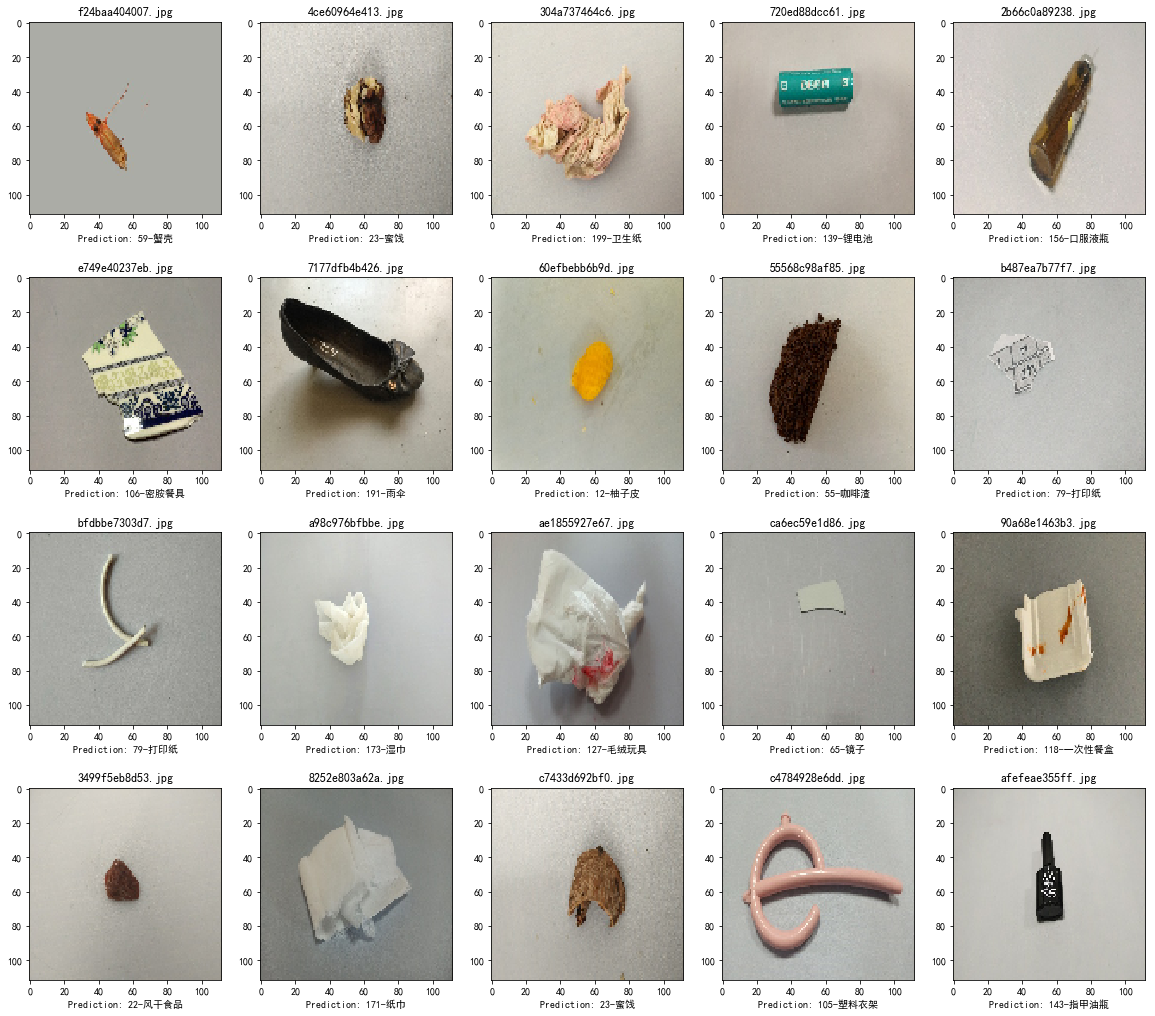
Observe random 20 images

1
2
3
4
5
6
7
8
9
10
11
12
13
14
15
16
17
randNums = random.sample(range(0, len(valiset_filenames)), 20)
plt.figure(figsize=(20,18))
for i in range(0,20):
filename = valiset_filenames[randNums[i]]
image_path = valiset_path + '/' + filename
img = image.load_img(image_path, target_size=(112, 112))
x = image.img_to_array(img)
x = np.expand_dims(x, axis=0) /255
pred = model.predict(x)
index = np.argmax(pred)
result_name = getname(index)
result_label = get_category_id(result_name)

plt.subplot(4,5,i+1)
plt.imshow(x[0])
plt.title(filename)
plt.xlabel("Prediction: %d-%s"%(result_label, result_name))

87OS7d.png

Save results

1
2
3
4
5
6
resultName = 'test0'
with open('./PredictResults/' + resultName + '.csv','w') as f:
f.write("id,label\n")
for i in range(len(valiset_filenames)):
vali_id = str(valiset_filenames[i]).replace('.jpg','')
f.write("%s,%s\n"%(vali_id, str(results_label[i])))